Case study · demo org
What one scan found in a Salesforce demo org
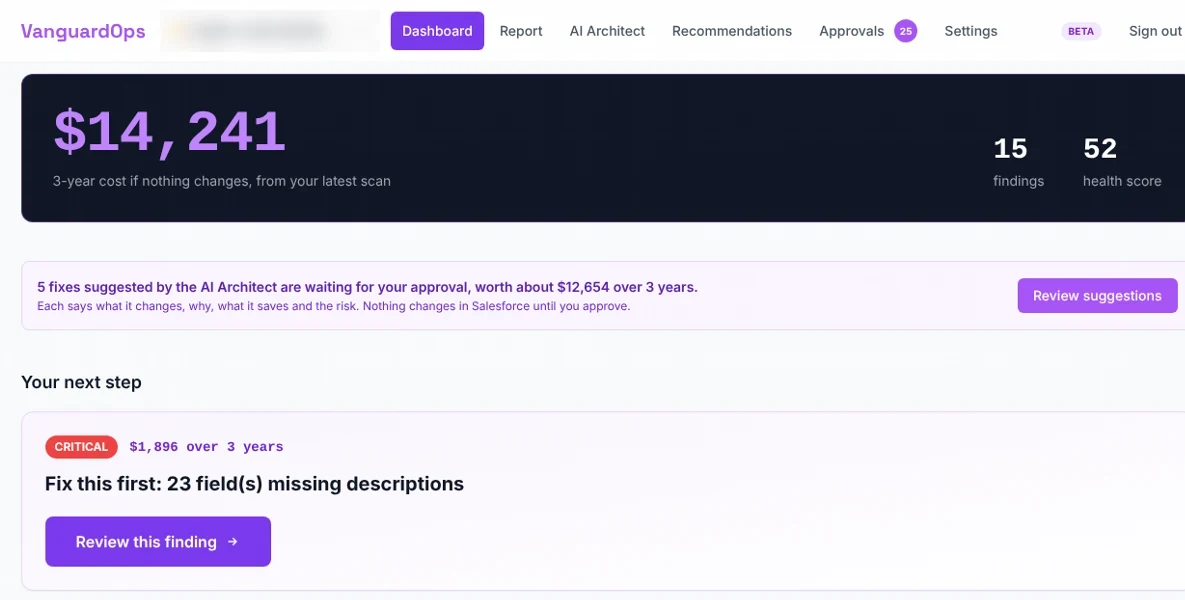
15 findings: 10 problems that would cost $14,241 over three years if left alone, and 5 things the org hasn’t built yet. The two urgent ones take about 4.5 hours to fix.
By VanguardOps, written by a Salesforce architect with 13+ years in enterprise orgs. Updated November 18, 2026.
- Health score
- 52/100
- Health score
- Grade F: needs cleanup
- 3-year cost if nothing changes
- $14,241
- 3-year cost if nothing changes
- From the 10 problems
- Agentforce readiness
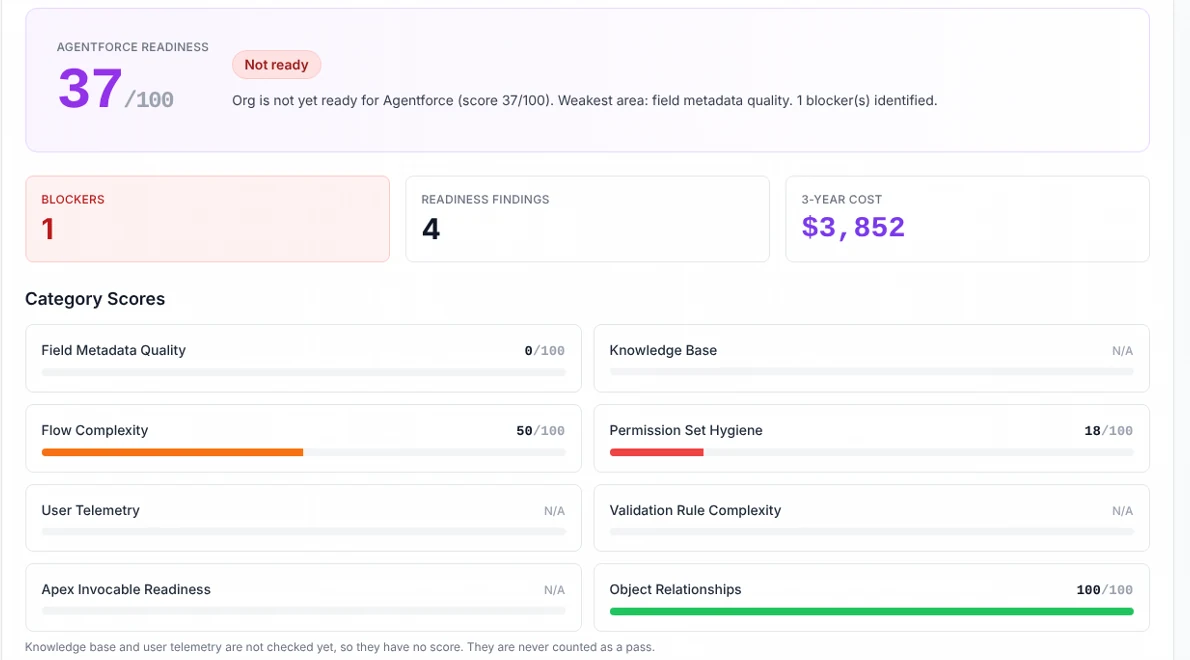
- 37/100
- Agentforce readiness
- Not ready yet: 1 blocker
- To fix the 2 urgent issues
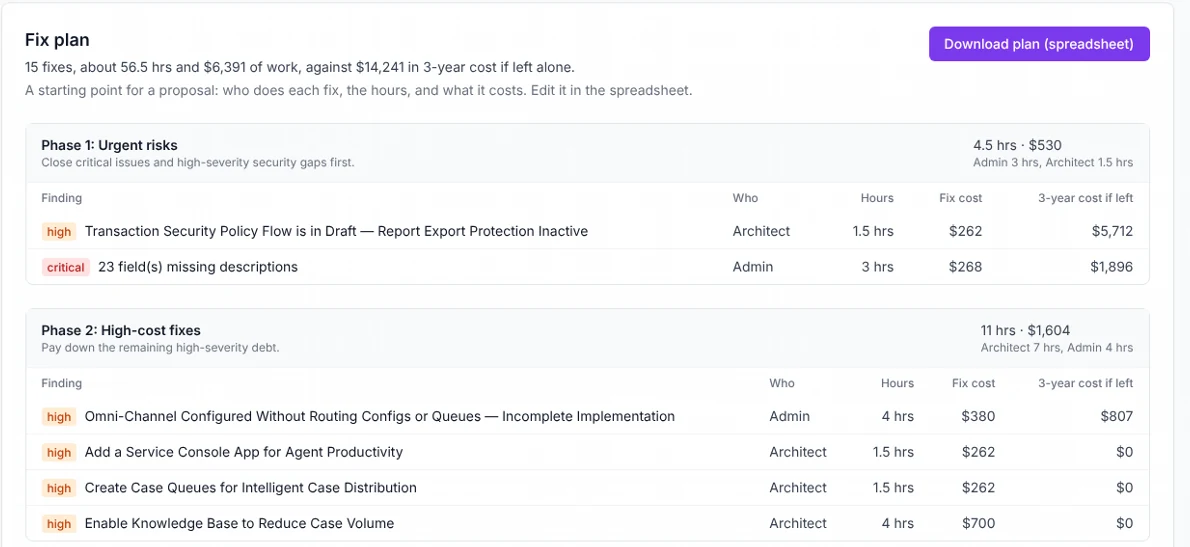
- $530
- To fix the 2 urgent issues
- About 4.5 hours of work
The org we scanned
A free Salesforce test org (Developer Edition) that VanguardOps owns, with Service Cloud features turned on and Salesforce’s Agentforce permission sets installed. It holds no customer data. The scan on November 18, 2026 read how the org is built, never the records in it.
Fix first: two urgent issues, $530
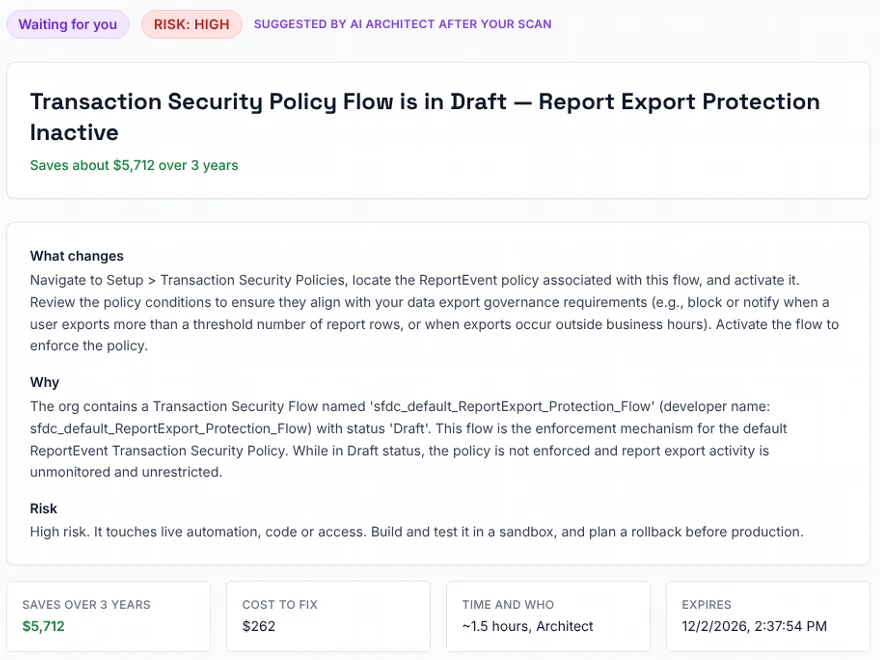
- Report exports aren’t watched. A security policy that would log or block big report exports was never switched on. Left alone: $5,712 over three years. To fix: $262, about 1.5 hours.
- 23 fields don’t say what they’re for. People, and AI agents, have to guess. Left alone: $1,896. To fix: $268, about 3 hours.
All 10 problems, priced
Risk is how much harm a problem can do. Cost is what it adds up to over three years if nobody fixes it. The two don’t always line up. Together these ten come to $14,241.
| Problem | Risk | 3-year cost |
|---|---|---|
| Report exports aren't watched: the export security policy was never switched on | Risk: High | 3-year cost: $5,712 |
| An outside app can sign in from any network (connected app with no IP limits) | Risk: Medium | 3-year cost: $2,754 |
| 23 fields don't say what they're for (no description) | Risk: Critical | 3-year cost: $1,896 |
| 22 permission sets that nobody is assigned to | Risk: Medium | 3-year cost: $1,485 |
| Omni-Channel is on, but nothing tells it where to send cases | Risk: High | 3-year cost: $807 |
| An outside app with no note on what it's for (connected app, no description) | Risk: Medium | 3-year cost: $552 |
| Two case assignment rules with the same name, “Standard” | Risk: Medium | 3-year cost: $402 |
| 24 permission sets that don't say what they're for | Risk: Medium | 3-year cost: $309 |
| One flow named outside the org's naming pattern | Risk: Medium | 3-year cost: $162 |
| One case record type used for every kind of case | Risk: Low | 3-year cost: $162 |
The other 5 findings are things the org hasn’t built yet, like case queues and Knowledge. Those are projects, not problems, so they add nothing to the cost.
The fix plan: who, how long, how much
All 15 items in three phases, urgent first. Each row shows who does it, the hours, the cost to fix and the cost of leaving it.
Agentforce readiness: 37 out of 100
Agentforce is Salesforce’s AI agent. This score shows how ready the org is to run one, and the answer is not yet. One blocker stands in the way: the 23 fields with no description, which an agent needs to know what each field is for.
How a fix gets made
- Draft. VanguardOps writes the exact change, and you can read it first.
- Check. Salesforce test-runs it without saving anything.
- Approve. An admin approves that exact change.
- Apply. It goes into a sandbox, a test copy of the org, never straight to production.
- Undo. One click takes it back out.
What this case study doesn’t show
- A demo org is small and young, so its findings and dollar figures are smaller than a production org’s.
- Dollar figures are estimates from the published cost model, not quotes.
- No fix from this report has been applied to this org yet.
- What does the health score mean?
- It sums up the shape of the org's setup from 0 to 100. 90 or more is an A, 80 a B, 70 a C, 55 a D, and under 55 an F. It grades this org on its own, not against other orgs.
- Why does the dashboard say to fix the fields first?
- The dashboard points to the highest-risk item, and the 23 fields are rated critical. The export policy costs the most if left alone. Both sit in the first phase of the fix plan.
- Is this a customer's org?
- No. It is a free Salesforce Developer Edition org that VanguardOps owns and uses for its own work. No customer data is in it, and the scan read only metadata.
- Are the dollar figures real?
- They are the scan's own estimates for this org, copied from its report without changes. They come from the published cost model and are scaled to the org's size, so a small demo org prices low. They are estimates, not quotes.
- Why are some findings priced at zero?
- Something the org has never built, like Knowledge or case queues, is a project to take on, not debt it carries. The report lists those as new builds and leaves them out of the total.
- Will my org look like this?
- Probably not. This org is small and lightly configured. The same checks run on any org, and an org with more fields, access and automation gives them more to find.